

Disconnected warehouse systems reduce productivity by creating manual work, disrupting workflows and increasing errors. When barcode scanners, warehouse management systems (WMS) and enterprise resource planning (ERP) systems fail to communicate effectively, employees spend valuable time reentering data, resolving discrepancies and troubleshooting issues. These inefficiencies increase labor costs, slow fulfillment and limit operational performance. By assessing the entire AIDC environment, identifying integration gaps and improving how systems work together, businesses can reduce downtime, streamline warehouse operations and improve productivity. A single-source AIDC partner like GO2 Partners helps identify and resolve these issues across devices, systems and workflows.
Every time work passes from a scanner to the WMS, from the WMS to the ERP, or from one application to another, there’s a handoff. When those connections work, the handoff is smooth and invisible. When they don’t, the warehouse pays for it in human effort.
Someone has to:
-
Enter the same information twice
-
Switch between systems
-
Stop and investigate an exception
-
Restart a transaction
-
Escalate an issue to IT or a supervisor
It takes a lot of labor to keep disconnected systems moving. Read on to see where that time goes and how to get it back.
Where Does the Time Go When Systems Don’t Connect?
The shift was fully staffed. Nothing catastrophic happened. Equipment was mostly working. Yet picks ran behind, supervisors spent the day putting out fires, and overtime crept up again.
Where did the productivity go?
Often, it gets lost in the extra work required to move information between systems.
A scanner captures an action. The warehouse management system, or WMS, directs activity inside the warehouse. The enterprise resource planning system, or ERP, connects that activity to orders, purchasing, inventory and the rest of the business.
Those systems exchange information constantly. When that exchange fails or requires manual intervention, employees have to step in and keep the process moving.
An individual delay may cost only a few seconds or minutes. The bigger problem is what happens when that same delay interrupts a high-volume process hundreds or thousands of times.
How Does Disconnected Technology Create More Exception Work?
Warehouses run best on repeatable transactions.
Scan. Confirm. Move. Pick. Pack. Ship.
Disconnected systems turn routine transactions into exceptions.
For example: A scan doesn’t update the next system, so a worker checks another screen. The information still doesn’t match. Rather than hold up the line, they jot down the transaction or track it in a spreadsheet so they can enter it later.
The workaround keeps product moving, but now someone has to remember to go back, update the system and resolve any discrepancies created in the meantime. A routine transaction has become extra work. And sometimes that extra work becomes the routine.
Exception work can also pull more experienced employees away from productive work. A picker hits a problem. A team lead gets involved. Then a supervisor. Maybe IT or an outside vendor joins the conversation.
Why Do These Problems Continue?
Problems with a disconnected system can be difficult to diagnose because everyone sees a different part of the environment.
-
The scanner vendor sees the device.
-
The software provider sees its application.
-
IT sees the support ticket.
-
The Ops Manager sees the lost productivity.
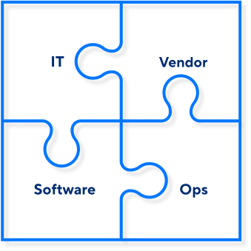 Each individual component may appear to be working. The problem exists in the handoffs between them. That makes it easy to fix individual symptoms without addressing the larger process.
Without someone looking across the entire environment, the same productivity issues can keep coming back.
How Can You Reduce the Productivity Cost of Disconnected Systems?
Start by looking at the entire transaction, not just the individual technologies involved.
Follow the work from beginning to end:
-
Where does the information originate? Where does it need to go?
-
Where does the transaction pause? Where is information entered again?
-
Where do employees leave the standard workflow to get the job done?
Those points of friction show where systems, devices or processes are failing to work together.
This is where a single-source AIDC partner can make a difference.
One partner looking across devices, software, integrations and workflows can find problems that individual vendors only see in pieces. That creates a clearer path to fixing the handoffs, reducing exception work and keeping employees focused on moving product.
GO2 Partners helps organizations assess their AIDC environments, identify integration gaps and build solutions that improve how technology works together across warehouse operations.
If disconnected systems are creating extra work across your operation, contact GO2 Partners to find out where the friction is coming from and how to eliminate it.